Seasonal Events
Pick the holidays Buddy celebrates with your server, with countdowns, greetings and full holiday events with drops, a daily calendar and collectible badges.
On this page
Seasonal Events let Buddy celebrate the holidays your server cares about. You pick which ones, and for each one how much Buddy does. Nothing happens for a holiday you didn't pick.
Picking your holidays#
Set it up on the dashboard's Seasonal Events page, or with /event → Setup in Discord. Start with
a quick preset (Big ones or Everything) and then change any holiday you like. Each holiday
can be:
| Setting | What Buddy does |
|---|---|
| 🎉 Full celebration | Countdowns, a greeting on the day, and the full event: drops, a daily calendar and collectibles. Every holiday can have one. |
| 📣 Countdown + greeting | Countdown posts before the holiday and a greeting on the day. |
| ❔ Ask me each year | Two weeks before, Buddy asks the server owner whether to celebrate it this year. Nothing happens unless someone says yes (see Answering "Ask me each year"). |
| ⏸️ Off | Not celebrated. |
The calendar covers seasons and big events, fun days, cultural and religious holidays, and awareness months. Holidays that follow the lunar calendar (like Ramadan, Diwali or Lunar New Year) can be a day off in some places.
You can write your own greeting for any holiday. {server} is replaced with your server's name and
{year} with the year.
To check your setup before a holiday starts, run /event → Preview and pick a holiday or one of your
own events. Buddy shows you (and only you) the post it will make, and tells you if something is
missing, like an event channel or drop channels.
If you switch a holiday off and back on before it's over, Buddy picks it up again. The same goes for switching Seasonal Events off and on. A holiday the owner skipped through Ask me each year stays skipped that year unless you set it to another setting.
Answering "Ask me each year"#
Buddy asks the server owner in a DM, but the owner doesn't have to be the one who answers. While a
question is open, it also shows in /event → Setup and in a Waiting for your answer card
on the dashboard's Seasonal Events page. Press Celebrate it or Skip this year. If
nobody answers before the holiday starts, it's skipped this year.
Ending an event that's running#
If a change in /event → Setup would switch off a holiday whose event is running right now
(or switch Seasonal Events off altogether), Buddy holds the change and asks first. Press
End event to go ahead: Buddy ends the event within a minute and turns leftover tokens into
Buddy credits. Press Keep it and nothing changes.
Use a preset, then change any holiday.
Countdowns, greetings, event messages and recaps go here.
Holidays start at midnight in this timezone.
Only needed for full celebrations.
Countdowns#
Buddy posts a countdown in the event channel before each holiday you picked: 30, 7 and 1 days before by default. Change the days on the dashboard, or leave them empty for no countdown posts. Countdowns go out at 6 AM in your server's timezone, and the start time they show is midnight in that timezone (Discord shows it to each member in their own time).
For a countdown everyone can see, pick a countdown channel: a voice channel Buddy renames once a day, like "❄️ Winter Holidays in 16 days". Lock it so nobody joins.
Members can see what's coming with /event → Upcoming, or check one holiday with /event → Countdown.
Daily countdown#
Want a countdown every day instead of a few times? Turn on the daily countdown (dashboard >
Seasonal Events > Daily countdown, or /event → Setup > Daily countdown). Once a day, at the time
you pick, Buddy posts the countdown image for one holiday.
| Setting | What it does |
|---|---|
| Count down to | The next holiday coming up (Buddy moves on to the following one by itself), or one holiday you pick. Only holidays this server celebrates are counted down to. |
| Channel | Where it's posted. Leave it on the event channel or pick another one. |
| Time | When it's posted each day, in your Seasonal Events timezone. |
| Start counting | How many days before the holiday the daily posts begin (30 by default, 0 = always). |
| Days of the week | Skip the days you don't want a post on. |
| Look | An embed with the image, just the image, or text only. |
| Message | Your own text under the title. {holiday}, {emoji}, {days}, {countdown}, {date}, {relative}, {server} and {year} are filled in. |
| Ping a role | Optional. Pinged with every daily post. |
| Remove yesterday's countdown | Keeps one countdown in the channel instead of a new one every day. The last one is removed when the holiday starts. |
| "Next holiday" also counts your own events | Off by default, so a weekly event doesn't take over the countdown. |
Every setting is on the dashboard and in /event → Setup (pages Daily countdown and Daily
countdown: look & extras). The daily countdown has its own switch: switching off countdown posts
for every holiday doesn't stop it.
The last countdown is the day before the holiday; on the day itself Buddy posts the greeting. On
days the daily countdown covers a holiday in the event channel, the usual countdown post for that
holiday is skipped, so members never see two. If Buddy was offline at the set time, it still posts
up to 6 hours late. Use Preview in /event → Setup > Daily countdown to see it right away.
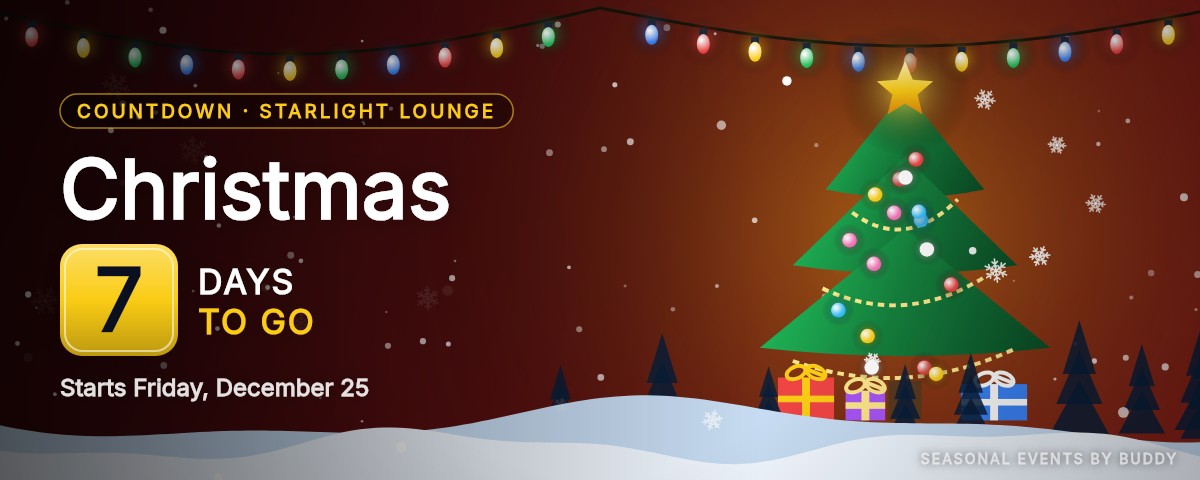
Every countdown, greeting, event message and recap comes with a festive banner in the holiday's own theme: snow and a snowman for Winter Holidays, a glowing menorah for Hanukkah, lanterns for Lunar New Year, and so on.
The countdown banner for Christmas, a week before:

Discord server events#
Buddy also adds each holiday to your server's Events list (the calendar at the top of the channel list), up to a month ahead, with the holiday's banner as the cover. Members who press Interested get a reminder from Discord when it starts, and countdown posts have a Get notified button that opens it. Buddy starts the event when the holiday starts and ends it when the holiday ends. If you skip the holiday or turn it off, Buddy removes the event.
If you already made an event for the holiday yourself (its name includes the holiday's name, like "Christmas Party" for Christmas), Buddy uses yours and doesn't make another one. Buddy never starts, ends or deletes events it didn't make. If you delete Buddy's event, it isn't made again that year.
Your own events#
Add your server's own events next to the holidays: Friday Night Farming, game nights, your server's birthday, a tournament final, a movie night or a watch party. Each one gets the same treatment as a holiday:
- Countdown posts on your countdown days, plus a heads-up on the day for events that start later in the day.
- A greeting in the event channel when it starts. Write your own, or use Buddy's.
- A festive banner in the theme you pick: party, birthday, gaming, tournament, music, movie night, space, or one of the farm themes (a tractor at dusk, a barn under the stars, a golden harvest field), or the look of any holiday.
- A Discord server event in the Events list. If you pick a voice or stage channel, the event is held there. Otherwise it points to your event channel.
Events can happen once, every week or every year, start at a set time (or last all day) and run from 1 hour up to 31 days (a week for weekly events). A weekly event happens on the same weekday as its date. To keep the event channel tidy, weekly events get a reminder the day before and a heads-up on the day instead of the usual countdowns.
Ready-made events fill everything in for you: 🚜 Friday Night Farming, 🌙 Saturday Night Farming, 🌾 Sunday Farm Day, 🚜 Midweek Farming, 🌾 Harvest Night, 🎮 Game Night, 🍿 Movie Night, 🎂 Server Birthday and 🏆 Tournament. Pick one, then change anything you like.
Add, edit, pause and delete events on the dashboard under Your own events, or in Discord:
/event→ Add an event opens a form. EnterFriday Night Farmingas the name to set up a weekly Friday 8 PM farm night, and fill in Time or Repeat to change it.- For your own, enter any name with a date, for example
Server BirthdayonMar 14, orCup FinalonDec 4at7pm. The form covers name, date, time, repeat and description. - After adding one, press Edit more options on Buddy's reply. It opens a panel where you set how long the event lasts, its emoji and greeting (Length, emoji & greeting), the Banner theme and a Voice or stage channel. To change the date or pause it, use the dashboard.
/event→ Remove an event deletes one.
When you change an event's date, time or name, Buddy updates its countdowns and its Discord server event to match. A server can have up to 25 events. Times use the Seasonal Events timezone. If Seasonal Events were never set up, adding an event switches them on with no holidays picked.
Full celebrations#
A full celebration runs for the whole holiday. When it starts, Buddy posts an event message in the event channel with buttons to open the daily calendar, see your collection and see the leaderboard. If you picked an Event Pings role, it's pinged once when the holiday starts. Buddy never pings @everyone.
The calendar, collection and leaderboard buttons are on that event message, so Buddy keeps it there. If it was never posted (for example no event channel was set when the holiday started) or someone deleted it, Buddy posts it again within a few minutes. The Event Pings role isn't pinged a second time for a message that's put back.
- 🎁 Drops. While people are chatting in a drop channel, Buddy now and then drops an item. Everyone who presses Grab it within a minute gets it, so it isn't a race. Members can grab up to 10 drops a day. Set how often drops appear with Drops (low, normal or high).
- 📅 Daily calendar. One door a day with event tokens, and sometimes an item. Opening doors on days in a row gives a streak bonus. Use
/event→ Daily door or the button on the event message. - 🏅 Collectibles. Collect every item in the set for bonus tokens and a badge you keep, like Winter Holidays 2026. See your badges with
/event→ My collection. - 🪙 Event tokens. Drops, doors and duplicate items give event tokens. When the event ends they turn into Buddy credits (10 tokens = 1 credit, up to a cap per event).
- 📜 Recap. When the event ends Buddy posts a recap with the top collectors.
Every holiday can have one#
Every holiday on the calendar has a full celebration, each with its own tokens, daily calendar and
collectibles. Set a holiday to Full celebration on the dashboard, or tick it under /event →
Setup > How much for each.
The festive ones start as a full celebration when you pick them or use a preset: Winter Holidays, Christmas, New Year, Valentine's Day, Easter & Spring, Summer and Halloween, plus Hanukkah. Every other holiday starts as Countdown + greeting. Holidays you already picked keep the setting they have, so nothing changes until you change it or apply a preset again.
Holidays that last a day or two are smaller: a short set of collectibles, one thing to open (or light, or fill) on the day, and drops that appear about twice as often so the set can be finished in time. A few calmer ones (Hanukkah, Kwanzaa and the awareness months) have a daily calendar and collectibles but no drops in chat.
With Ask me each year, a yes to one of the festive holidays (or Hanukkah) runs the full celebration. For the others the owner picks between Full celebration, Greeting only and Skip this year when Buddy asks.
| Holiday | Daily calendar | Collectibles | Drops in chat |
|---|---|---|---|
| ❄️ Winter Holidays | 📅 25-door advent calendar | 12 | Yes |
| 🎄 Christmas | 🧦 Open your stocking on the day | 4 | Yes |
| 🎆 New Year | 📝 Open your resolution card on the day | 4 | Yes |
| 💘 Valentine's Day | 💝 Open your valentine on the day | 4 | Yes |
| 🐣 Easter & Spring | 🧺 Open your basket on the day | 4 | Yes |
| ☀️ Summer | 🏖️ Open your beach bag on the day | 4 | Yes |
| 🎃 Halloween | 🎃 Open your treat bag on the day | 4 | Yes |
| 🦃 Thanksgiving (US) | 🍽️ Fill your plate on the day | 4 | Yes |
| 🍂 Thanksgiving (Canada) | 🍽️ Fill your plate on the day | 4 | Yes |
| 🤡 April Fools' Day | 📦 Open your prank box on the day | 4 | Yes |
| 🥧 Pi Day | 🥧 Open your pie box on the day | 4 | Yes |
| 🎭 Mardi Gras | 🍰 Cut your slice of king cake on the day | 4 | Yes |
| ☘️ St Patrick's Day | 💰 Open your pot of gold on the day | 4 | Yes |
| 🌍 Earth Day | 🌻 Open your seed packet on the day | 4 | Yes |
| 🚀 May the 4th | 🛰️ Open your supply pod on the day | 4 | Yes |
| 🍁 Canada Day | 🧺 Open your picnic basket on the day | 4 | Yes |
| 🎇 Independence Day (US) | 🧺 Open your picnic basket on the day | 4 | Yes |
| 🏴☠️ Talk Like a Pirate Day | 🗝️ Open your treasure chest on the day | 4 | Yes |
| 🕎 Hanukkah | 🕎 Light one candle each night (8) | 8 | No |
| 🕯️ Kwanzaa | 🕯️ Light one candle a day (7) | 7 | No |
| 🧧 Lunar New Year | 🧧 Open your red envelope on the day | 4 | Yes |
| 🌙 Ramadan | 🏮 Light your lantern on the day | 4 | Yes |
| 🌙 Eid al-Fitr | ✉️ Open your Eidi envelope on the day | 4 | Yes |
| 🐑 Eid al-Adha | 🎁 Open your gift on the day | 4 | Yes |
| 🌱 Nowruz | 🌱 Set your Haft-sin table on the day | 4 | Yes |
| 🎨 Holi | 👝 Open your color pouch on the day | 4 | Yes |
| 🍷 Passover | 🍽️ Set your Seder plate on the day | 4 | Yes |
| ✊ Juneteenth | 🍽️ Fill your plate on the day | 4 | Yes |
| 🥮 Mid-Autumn Festival | 🏮 Light your lantern on the day | 4 | Yes |
| 🍎 Rosh Hashanah | 🍯 Dip your apple on the day | 4 | Yes |
| 🪔 Diwali | 🪔 Light your diya on the day | 4 | Yes |
| 💀 Día de Muertos | 🕯️ Place one offering a day (2) | 5 | Yes |
| ✊🏾 Black History Month | 📖 Turn one page a day (28) | 10 | No |
| 💜 Women's History Month | 📖 Turn one page a day (31) | 10 | No |
| 🏳️🌈 Pride Month | 🌈 Open one door a day (30) | 10 | No |
You can switch off any part (countdowns, event messages, drops, daily calendar, collectibles, recaps or Discord server events) for every holiday on the dashboard.
Accounts newer than 7 days can't grab drops, and badges need an account at least 30 days old in a server with 10 or more members. This keeps alt accounts from farming events.
Commands#
| Command | What it does |
|---|---|
/event → Upcoming | The next holidays this server celebrates, with countdowns. |
/event → Countdown | How long until a holiday. |
/event → Daily door | Open today's calendar door. |
/event → My collection | Your items, tokens and badges. |
/event → Leaderboard | The top collectors in the current event. |
/event → Setup | Pick holidays and settings (needs Manage Server). |
/event → Preview | See what Buddy will post when a holiday or event starts, with setup warnings. Only you see it (needs Manage Server). |
/event → Add an event | Add your own event: name, date, time, repeat and description (needs Manage Server). |
/event → Remove an event | Delete one of your events (needs Manage Server). |
/event → Event timers | Countdowns that rename a category or voice channel (needs Manage Server). See Event timers. |
Running /event opens a private menu with a button for each action. Setup, Preview, Add an event,
Remove an event and Event timers sit in the Staff tools & settings dropdown, and only show for members who can use
them. If your server uses Roles I pick for command access, you can give
an action like /event → Setup to a role that doesn't have Manage Server.
Buddy Games during an event#
While an event is running, the Buddy Games join in: the Higher or Lower card backs and the Scratch Cards foil switch to the event's colours, and during a full celebration the daily quests get a bonus event quest that pays the event's tokens.