XP card designer
Give your rank card, level-up card and leaderboard your server's own look. Pick a ready-made design, choose colours and a background, upload your own picture and decide what each card shows.
On this page
- Before you start
- Set it up
- Settings explained
- Colours
- Background
- Level-up card
- Layout and details
- Examples
- Troubleshooting
- My picture doesn't show on the cards
- The text is hard to read on my picture
- A member's card has different colours
- The cards change colour by themselves
- Level-up messages have no image
- Related
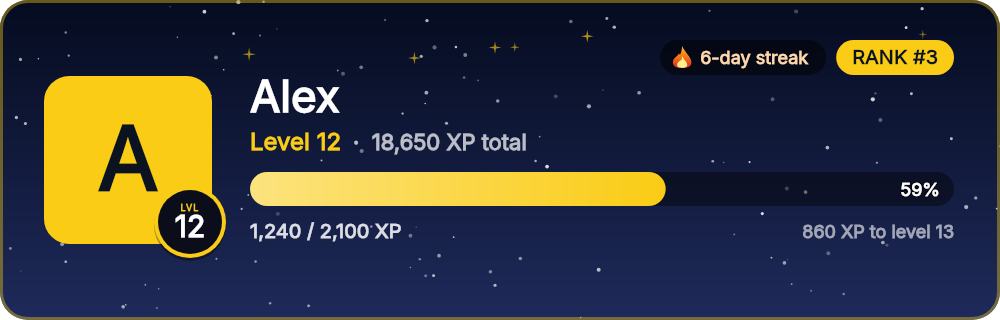
The XP card designer changes how Buddy's XP images look in your server. You pick the colours and the background, or upload your own picture, and the preview shows the real cards as you go. One design covers every XP image: rank cards, level-up cards, the leaderboard, stats, quests, community goals and XP drops.

🧭 /xp → Rank card
Before you start#
- XP has to be on for the cards to be used. See XP and levels.
- The designer is in the dashboard only. You need Administrator on the server to open it.
Set it up#
It is under Levels & engagement. The preview shows your rank card, level-up card and leaderboard with sample members.
Each tile is a ready-made design. Picking one fills in the colours and options below it. Pictures you uploaded are kept.
Under Colours, pick A colour preset and one of the presets, or My own colours and set the background, second background, accent and text colours.
Under Background, pick A built-in background and one of the tiles, or My own picture and press Upload.
Drag the picture on the card to choose the part that shows, and scroll over it to zoom. The sliders do the same, and add Colour over it and Blur.
Buddy uses the new design within a minute.
Settings explained#
Colours#
| Setting | What it does | Default |
|---|---|---|
| A colour preset | Uses one of Buddy's presets: Midnight, Ocean, Sunset, Forest, Royal, Mono or Seasonal. | Midnight |
| My own colours | Uses your four colours: Background, Second background, Accent (the XP bar, badges and highlights) and Text. | Off |
| During a season or holiday event | When the cards take the season's colours: level-ups and XP drops only, every XP image, or never. Your background picture always stays. | Level-ups and XP drops |
| Members' own colours | Whether members can pick a colour preset for their own cards, or everyone uses your design. | Members can pick |
Background#
| Setting | What it does | Default |
|---|---|---|
| A built-in background | One of the built-in backgrounds, drawn in your colours. | Classic |
| My own picture | Your uploaded picture behind every XP image. JPG, PNG or GIF, up to 8 MB. Wide pictures work best. | Off |
| Left / right, Up / down, Zoom | The part of your picture that shows. | Centred, not zoomed |
| Colour over it | How much colour covers the picture. More makes the text easier to read. | 35% |
| The colour over it | Your background colour, or another colour you pick. | My background colour |
| Blur | Softens the picture. | 0 |
| Brightness | Makes the picture darker or lighter. | 100% |
| Colour strength | How strong the picture's colours are. 0% is black and white. | 100% |
| Effects over the background | Small shapes over the card: snow, petals, sparkles or leaves. Automatic uses the season's while one runs. | Automatic |
| Card corners | Rounded or square. | Rounded |
Level-up card#
| Setting | What it does | Default |
|---|---|---|
| Headline | The big text on the card. Letters, numbers and punctuation only. | LEVEL UP! |
| Confetti | Confetti in your colours. | On |
| Level-up picture | An optional picture just for level-ups. Without one, level-ups use the background above. | None |
Layout and details#
| Setting | What it does | Default |
|---|---|---|
| Avatar shape | Circle, rounded square or square. | Circle |
| XP bar and XP bar colour | Rounded, block or a thin line, in one colour or a gradient. | Rounded, one colour |
| Panel behind the text | A see-through or dark panel that helps the text stand out on a busy picture. | None |
| Leaderboard title | The title at the top of the leaderboard image. | XP Leaderboard |
| Show on the cards | Switch each part on or off: avatar ring, level badge, server rank, activity streak, total XP, percent, XP needed for the next level, seasonal collection and the outline. | All on |
Examples#
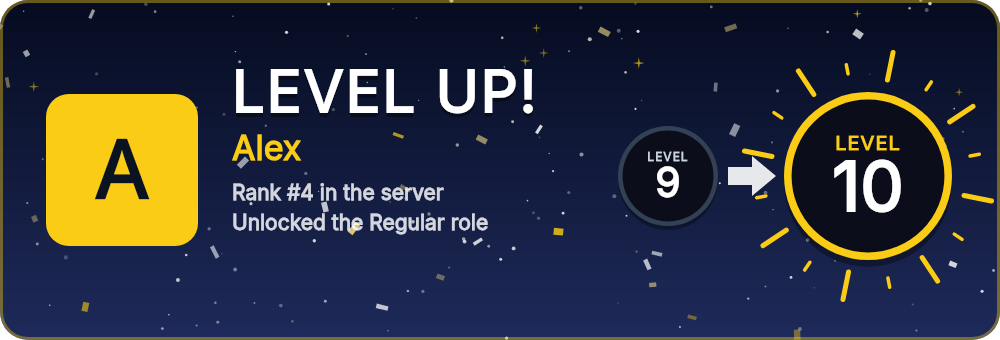
A level-up card in the same design as the rank card above:
@Alex reached level 10! 🎉
Troubleshooting#
My picture doesn't show on the cards#
Check that My own picture is selected under Background and that you pressed Save card design. If the picture was removed, the cards go back to a built-in background.
The text is hard to read on my picture#
Raise Colour over it, add some Blur, or turn on Panel behind the text. With a light picture or light colours, pick a dark Text colour.
A member's card has different colours#
Members can pick their own colour preset. To keep every card on your design, set Members' own colours to Everyone uses this design.
The cards change colour by themselves#
During a season or a holiday event, level-ups and XP drops use that season's colours. Set During a season or holiday event to Never to always use your colours.
Level-up messages have no image#
The image is switched on with Attach the level-up card image on the XP & levels page.